
Gutenberg, the new WordPress editor
On 27 May 2018 WordPress turned 15, and like any teenager, it’s getting a bit rebellious and playful. All these years we’ve written posts first, and then pages, in a text editor very reminiscent of any email client like Gmail or a word processor like Word, but much simpler. But now the new WordPress editor is out, and we want to get to know it.
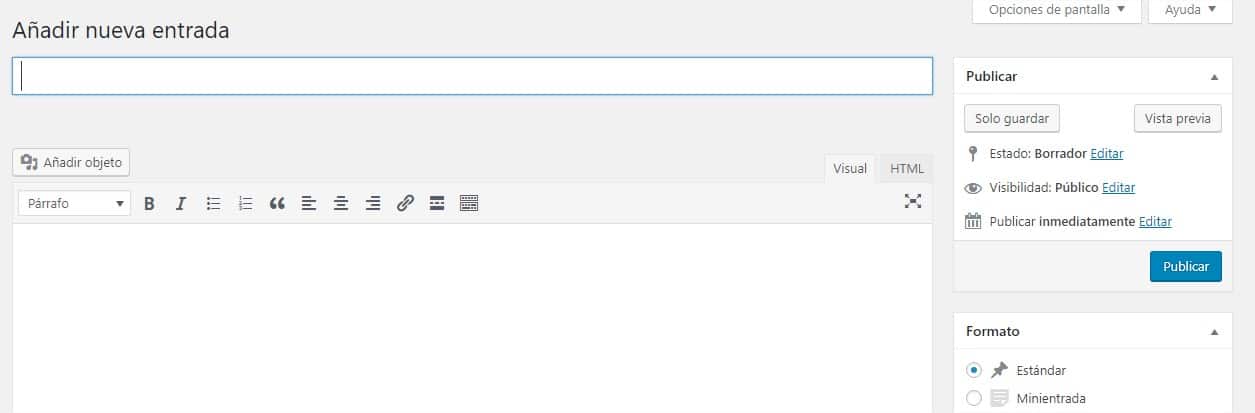
Like any teenager, WordPress wants to try new things, driving its parents and those who love it up the wall, and this kid has decided it wants to switch to Gutenberg, the new way of editing content in WordPress.
Gutenberg is nothing more and nothing less than a response to the way platforms like Wix or Medium handle content input, and it’s intended to replace TinyMCE. It’s a client-side editor built with React (a JavaScript framework), which gives it several characteristics, among them a very fast response.
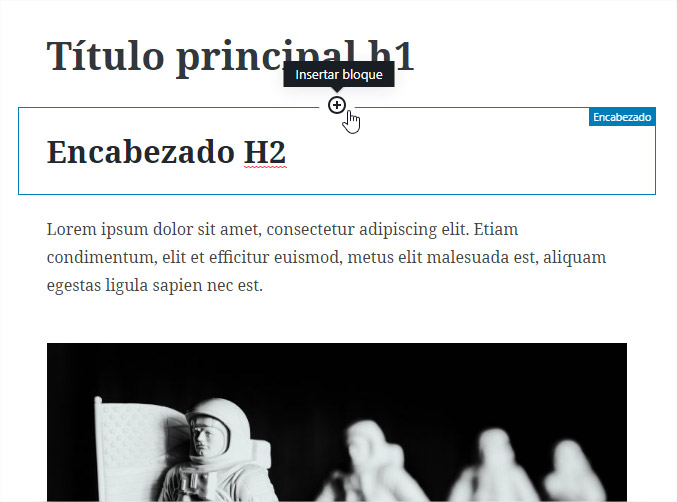
It also uses a block system, so users can see in real time an editing view as close as possible to the final result of the content they’re writing.
A brief history of the project
The first news about the Gutenberg project for WordPress came on 22 May 2017, when Matías Ventura announced what was new in Gutenberg on make.wordpress.org, explaining that they had a future editor for WordPress visible on GitHub, with 13 blocks implemented by the development team and contributors. But it wasn’t until 23 June 2017 that Matías Ventura announced that Gutenberg version 0.1.0 was available in the WordPress plugin directory for people to try. That’s when a barrage of criticism began; in fact Gutenberg has a very poor rating in the WordPress directory, because of the reviews in the first months (and because people are very impatient).
At the end of August 2017, on the 29th to be precise (some summer…), the development team announced Gutenberg version 1.0.0, with improvements such as drag and drop for media files, a selector to change thumbnail sizes for images in blocks, an inserter for adding new blocks, and so on. Even so, the project was still far too immature.
From the end of summer until Christmas, new versions of the plugin followed one another, with many improvements; the #WPDrama around Gutenberg kept coming, but the project went ahead until, almost at the end of the year (11 December), version 1.9 was released, featuring global reusable blocks as its main new feature.
It wasn’t until a month later, in mid-January 2018, that Gutenberg version 2.0 saw the light, with notable improvements such as the sidebar replacing the options drop-down menu, creating galleries by dragging multiple images, and more.
Throughout 2018 the improvements have been continuous and increasingly frequent, since there was talk of Gutenberg being released in the first quarter of 2018. Today, if we download the plugin, the version available at the time of writing is 3.1.0.
The news is that at the recent WordCamp EU (WCEU), WordPress co-founder Matt Mullenweg presented the Gutenberg project’s roadmap.
Where Gutenberg is heading
According to WPTavern’s report on Matt Mullenweg’s talk, during July 2018 a WordPress 4.9.x release will come out with a “strong invitation” to install either Gutenberg or the classic editor. From there, in August they aim to fix all the plugin’s critical issues and carry out the merge of Gutenberg into WordPress core. This would kick off preparations for the release of WordPress 5.0, which would be the official debut of the new WordPress editor.
Also, towards the end of the year, they want a mobile version of Gutenberg, one of the project developers’ big aspirations. This would be interesting, as it would let us write, or at least edit, any post comfortably from our phones. We’ll keep an eye on it. For now, those of us who work in this field see a challenge in explaining to our clients how they’ll have to deal with the new WordPress editor once there’s no going back after Gutenberg is merged into core.
In any case, the project is divided into several phases:
- Phase 1: This is the phase we’re in right now: the creation and rollout of the project. It involves all theme and plugin developers, and its main milestone is Gutenberg becoming the default editor with WordPress 5.0.
- Phase 2: In this phase Gutenberg starts looking at existing visual page builders (Divi, Visual Composer, Elementor…), with the idea of offering a free, standard option for the whole WordPress ecosystem (both .org and .com). The ultimate goal of this phase is to bring WordPress to as many users as possible, so they don’t move to platforms like Wix, Medium or Squarespace.
Visual editor vs text editor
As I said at the start of this post, until now we’ve worked in WordPress with a standard text editor. However, visual editors have existed for several years: everyone knows Visual Composer or Divi, which add so much weight to the sites they’re installed on, and which cause WordPress implementers so many headaches when we’re asked to migrate a site or change to a theme that no longer uses one of these visual editors.
On the other hand, these visual editors were recommended only for static pages. Gutenberg now introduces a difference: it will be available for both pages and posts. This is new, as it will let us add visual richness to the posts we write on our blog (although in some users’ hands this poses a very high risk of offending good taste).
Does this mean visual editors will disappear?
Not at all. There are two options:
- on the one hand, existing visual editors like Divi, Elementor, Page Builder or Visual Composer will adapt to the new way of editing text in WordPress.
- On the other, some companies will focus their efforts on developing new blocks to complement Gutenberg or improving some of the existing ones.
In any case, I think the average user benefits, because they’re starting from a much more comfortable editor for imagining the final look of the post.
How can I try Gutenberg in WordPress?
At the time of writing, you can get Gutenberg from the WordPress plugin directory and install it. You’ll see that when you go to edit a new post or page, at the top it gives you the option of using Gutenberg or the classic editor. Bear in mind that, despite how advanced the project already is and its imminent inclusion in WordPress core, Gutenberg is still a project in development, with critical bugs, so we can’t try it on production sites. But it’s worth installing it on test sites where we can try out its features.
Blocks
The main new feature Gutenberg brings is the use of blocks. One of the issues at code level was how to avoid one of the main problems with the best-known visual editors: lock-in. That is, when we uninstall a visual editor from our site, a bunch of strange codes are left mixed into the text (in the worst case), which are very annoying to clean up, or the internal HTML is left with loads of tags that do nothing for the page’s readability for search engines or screen readers (in the best case).
Gutenberg has solved this with a rather clever solution based on HTML comments, which are harmless, aren’t displayed when the page is sent to the browser, and which WordPress can interpret as blocks without any problem when it finds them.
Here’s an example of these comments that delimit each block, for a text block:
<!– wp:core/text –> <!– /wp:core/text –>
Some of the blocks we can find in Gutenberg are headings, paragraphs, images, videos, galleries, lists, buttons, third-party embeds, quotes, shortcodes, code, tables…
As you can see, this will save us some plugins we’ve had to use until now and makes text editing much more interesting and probably more comfortable, although only time will tell.
A tour of the Gutenberg interface
Next we’ll go over what we can find in Gutenberg and start getting familiar with its interface. To do so, let’s start with a video (in Spanish) where we go over the editor with an example and see what it can do:
Next, let’s see how editing works in Gutenberg and some of the blocks it includes today (June 2018):
Pros and cons of Gutenberg in WordPress
Let’s look at some pros and cons I see in the project today. Among the pros:
- Editing with blocks is comfortable.
- Some of the blocks it includes are really cool and save plugins, time and work.
- The editing workflow is quite fast.
- I really like the tool that shows the content structure, since at a glance we get a very pleasant visual outline of our document’s hierarchy.
- Developers and companies can get a lot out of it and create endless blocks that could be very interesting.
Among the cons:
- Although its release in WordPress core is very close, there are still loads of incompatibilities between Gutenberg and the thousands of plugins in the directory.
- For the average user, the abstraction of block editing may be a small barrier to entry.
- It’s not a true visual editor, but it’s quite close and heading in the right direction.
- The current blocks are still too limited compared with the elements we can find in some visual editors like Elementor.
Conclusions
For me, the main conclusion is that Gutenberg was necessary. It’s where WordPress needs to go, and most importantly, I hope it’s open enough for developers to add whatever it doesn’t include out of the box.
Although there’s still plenty of WPDrama ahead with the release, I think it will gradually fade away, and users will get used to the new WordPress editor, as it’s very comfortable. However, I don’t yet recommend switching to it on serious blogs that are essential to your business, as there will still be a transition period while loads of plugins adapt to Gutenberg.
Still, we can already say the future has arrived. It’s knocking at the door and we have to let it in, because otherwise we’ll soon be like those old fogeys who refused to accept Word 2010, stuck with the 2003 version, and finally had to give in.

Leave a Reply