
Leaflet Map is the WordPress plugin that embeds maps without relying on Google: no API key, no credit card and no cost. It works with shortcodes, supports GeoJSON, KML and GPX, and has more than 30,000 active installations with outstanding ratings. If you need maps that go beyond a simple location marker, this is your plugin.
What is Leaflet Map and what technology is it built on?
Leaflet Map is a WordPress plugin developed by Benjamin J. DeLong, better known as Bozdoz on GitHub, a Canadian developer, backed by an active community of contributors. It has been in the official directory since 2014, gets regular updates and is tested with the latest versions of WordPress.
Under the hood, the plugin is built on LeafletJS, the open-source JavaScript library created in 2011 by Volodymyr Agafonkin, which has become a de facto standard for interactive maps on the web. It’s used by companies such as Pinterest, Flickr and the United States Geological Survey, and the Mapbox platform itself is built on it. If you want to learn in depth what LeafletJS is and how it works, there’s a dedicated post here.
What Leaflet Map does is bring all that power to WordPress: no code, simple shortcodes, and access to a set of features that goes far beyond the typical location map.
Leaflet Map vs Map Block Leaflet: which one do you need?
Before going on, it’s worth clearing up something that causes confusion: in the WordPress ecosystem you’ll find these plugins based on LeafletJS, and they’re not the same.
Map Block Leaflet is a plugin focused on simplicity: two Gutenberg blocks, a visual interface, no technical configuration. It’s great if what you need is a location map on a contact page or to show a business’s several locations. If that’s your case, Map Block Leaflet is enough and you don’t need anything else.
Leaflet Map, on the other hand, is designed for those who need more. It works with shortcodes, which makes it far more flexible, and opens the door to working with real geographic data formats such as GeoJSON, KML or GPX. It’s the plugin for more demanding users: developers, GIS professionals or anyone who wants to do more than add a marker to a map.
| Map Block Leaflet | Leaflet Map | |
|---|---|---|
| Interface | Gutenberg blocks | Shortcodes |
| Complexity | Low | Medium to high |
| Use cases | Location maps, multiple locations | Data maps, routes, GIS layers |
| Supported formats | OpenStreetMap + alternative tiles | GeoJSON, KML, GPX, WMS and more |
| Ideal for | Any WordPress user | Developers and GIS professionals |
| Cost | Free | Free |
The two are complementary, not rivals. In the same project you can use Map Block Leaflet for the contact page and Leaflet Map for a section with routes or geographic data. That said, with Leaflet Map you can do the same as with Map Block Leaflet, just with a bit more work.
Why Leaflet Map and not a Google Maps plugin?
This is the million-dollar question, and there are very specific reasons. If you want to see performance data from a real experiment comparing six different solutions, there’s this post with all the details. Here’s a summary of the main arguments.
Real cost versus “free, but…”
Google Maps Platform switched to a subscription model in 2025. The Starter plan costs 100 dollars a month. There’s a free monthly credit, but you need an active billing account with a credit card. If you go over the limit, you get charged. With Leaflet Map the cost is zero: no card, no Google Cloud account, no surprises at the end of the month.
Privacy and GDPR
Every time a Google map loads on your site, your visitors’ data is sent to Google’s servers: IP address, location, browser. In Europe that has real legal implications and, in most cases, means you must ask for explicit consent before showing the map. OpenStreetMap, the base map Leaflet Map uses by default, has a completely different data policy. And if you want to go further, with Leaflet you can host your own tiles and not depend on any external server.
Performance
The LeafletJS library weighs about 42 KB. The Google Maps JavaScript API loads significantly heavier resources from its own servers, which means more external requests and a longer total load time. For a WordPress site where performance affects SEO, that difference matters.
Technological independence
Google already changed its API terms in 2018 and again in 2025. If your site depends on Google Maps and they change the rules, you have a problem. LeafletJS is open source under the BSD license: nobody can change the terms overnight, and if development stopped, anyone could take the code and carry on.
Cartographic flexibility
This is something rarely mentioned in posts about map plugins. With Leaflet Map you can work directly with standard geographic data formats: GeoJSON, KML, GPX, WMS. You can prepare your data in QGIS, export it as GeoJSON and load it straight into your WordPress map, with no API key, no cost and native support for WMS, the professional standard for web mapping. That’s something Google Maps–based plugins don’t offer for free or with the same technical depth.
What you can do with Leaflet Map: main features
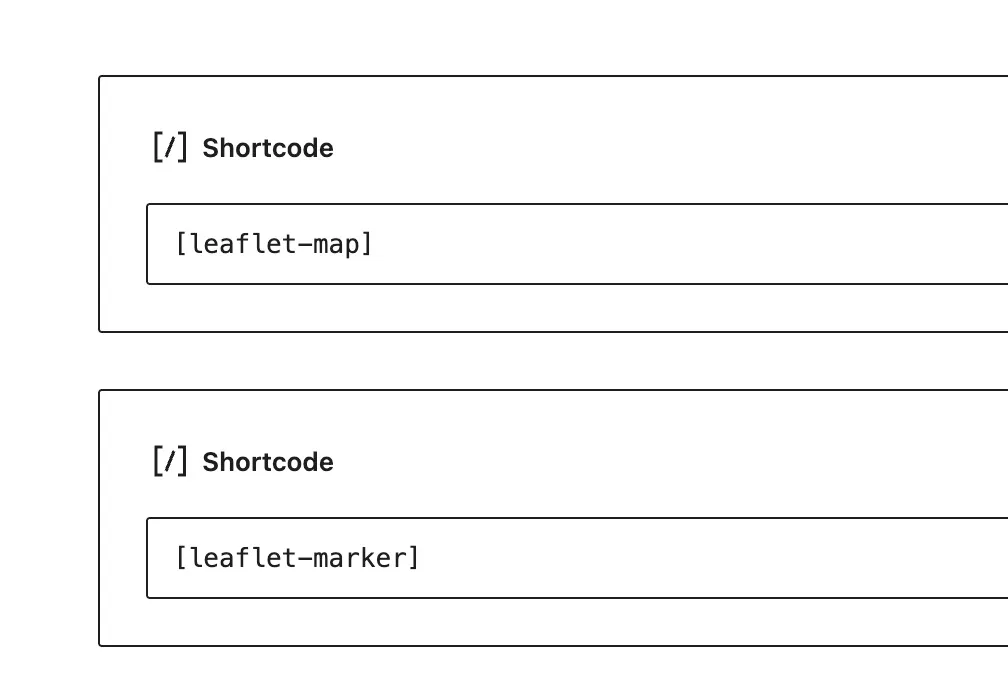
The plugin looks deceptively simple. A shortcode like [leaflet-map] is enough to get a working map in any post or page. But beneath that simplicity there’s a considerable number of options.
Basic features
- Insert a map with
[leaflet-map]and add markers with[leaflet-marker] - Set coordinates, zoom and height directly from the shortcode
- Add popups with HTML content to markers
- Change the map’s look with alternative tiles (different cartographic styles)
- Customize marker icons
Advanced features
- Import GeoJSON, KML and GPX files directly into the map
- Draw lines, polygons and circles on the map
- Load WMS layers, the professional standard for web mapping
- Extend its capabilities with the companion plugin Extensions for Leaflet Map, which adds experimental features such as GPX route maps, marker clusters and much more
This last point matters if you come from the GIS world: you can build a complete workflow from QGIS to your WordPress site, exporting data in standard formats and loading it straight into the plugin.
Who is Leaflet Map for?
Leaflet Map is a particularly good fit for these profiles:
- WordPress webmasters or developers who need to show maps with their own data and don’t want to depend on Google or pay for an API.
- GIS professionals who want to publish their maps on the web in an accessible way, without setting up complex infrastructure.
- Anyone concerned about GDPR who needs to avoid the legal implications of loading Google resources on their site.
- Developers working with real geographic data: routes, zones, thematic layers, GPX activity files, data exported from QGIS.
If you only need a simple map to show a business address, Map Block Leaflet is enough and more convenient. But if you need something more, Leaflet Map is the best option in the WordPress directory.
How to install Leaflet Map in WordPress
Installation is the same as for any plugin from the official directory:
- Go to Plugins > Add New Plugin in your WordPress dashboard.
- Search for
Leaflet Map. The right plugin is the one by bozdoz, with more than 30,000 active installations. - Click Install and then Activate.
- Go to any post or page, open the editor and add a Shortcode block.
- Type
[leaflet-map]and preview. You’ve got your first map.
You can find the plugin on its official page: Leaflet Map on WordPress.org.
This is just the starting point. If you like, in an upcoming post we can look at the plugin in detail from a more practical angle: how to configure the shortcodes, how to add markers and how to start working with real geographic data.


Leave a Reply